
Choosing the right storage solution is more important than ever in 2026. Whether you are storing personal belongings, business inventory, important documents, digital files, or large equipment, the wrong storage type can lead to unnecessary costs, security risks, and wasted space.
Storage is no longer simply about finding an available place to keep your belongings. Today, users can choose from traditional storage units, climate-controlled facilities, self-storage, warehouse storage, cloud storage, network-attached storage (NAS), and hybrid solutions.
With rising demand for flexible storage, smarter technology, improved security, and sustainable solutions, understanding the available options can help you make a better decision.
This guide explains the major types of storage, the factors you should consider, and the key storage trends shaping 2026.
What Is a Storage Type?
A storage type refers to the method or solution used to store and protect physical or digital items.
For physical belongings, storage may include:
- Self-storage units
- Climate-controlled storage
- Warehouse storage
- Portable storage
- Business storage
- Vehicle and equipment storage
For digital information, storage options include:
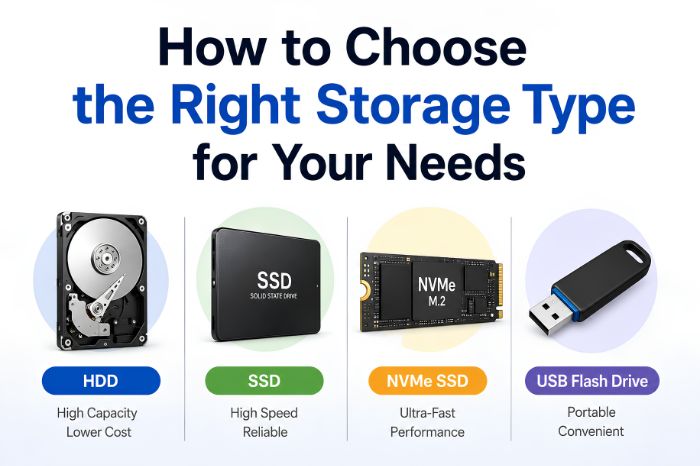
- Hard disk drives (HDDs)
- Solid-state drives (SSDs)
- Cloud storage
- Network-attached storage (NAS)
- External storage devices
- Hybrid storage systems
The best option depends on what you are storing, how much space you need, how frequently you need access, and your budget.
Why Choosing the Right Storage Type Matters
Selecting storage based only on price can create problems later. A solution that looks affordable initially may become expensive if you need additional space, stronger security, temperature control, or frequent access.
The right storage solution should provide a balance between:
- Capacity
- Accessibility
- Security
- Cost
- Convenience
- Scalability
- Protection
- Long-term reliability
For example, storing household furniture does not require the same conditions as storing electronics, business inventory, photographs, documents, or temperature-sensitive products.
Common Types of Storage in 2026
1. Self-Storage
Self-storage remains one of the most flexible options for individuals and small businesses.
Customers typically rent a storage unit for a specific period and can access their belongings according to the facility’s access policies.
Best for:
- Moving homes
- Decluttering
- Seasonal belongings
- Furniture
- Personal items
- Small business inventory
One of the biggest advantages is flexibility. You can generally choose a unit based on the amount of space you need and adjust your storage arrangement as your requirements change.
2. Climate-Controlled Storage
Climate-controlled storage is designed to provide a more stable environment than standard storage units.
This can be particularly useful for belongings that may be affected by excessive heat, humidity, or temperature fluctuations.
Best for:
- Electronics
- Wooden furniture
- Artwork
- Musical instruments
- Important documents
- Photographs
- Collectibles
If an item is sensitive to environmental conditions, paying more for controlled storage can be worthwhile.
3. Warehouse Storage
Warehouse storage is commonly used by businesses that need significantly more space than a typical storage unit can provide.
Companies can use warehouses to store inventory, raw materials, equipment, packaging supplies, and finished products.
Best for:
- E-commerce businesses
- Manufacturers
- Retailers
- Distributors
- Importers and exporters
- Large inventory
Modern warehouses are increasingly incorporating automation, inventory management software, robotics, and real-time tracking.
4. Portable Storage
Portable storage provides a convenient alternative to traditional storage facilities.
A storage container can be delivered direct to a home and filled as time permits. It’s great for clearing up space while upgrading and trying to sell phone models that you no longer need. The container can then remain on-site or be transported elsewhere.
Best for:
- Home renovations
- Moving
- Temporary storage
- Construction projects
- Business relocation
This option can reduce the need to repeatedly transport belongings between your home and a storage facility.
5. Business Storage
Small and growing businesses often need flexible storage without committing to a large warehouse.
Business storage can be used for stock, marketing materials, office furniture, tools, documents, and equipment.
The ideal solution depends on inventory turnover and how frequently employees need access.
6. Digital Storage
Digital storage has become essential for almost every business and individual.
Common options include:
- SSDs
- HDDs
- USB drives
- External drives
- Cloud storage
- NAS systems
- Enterprise storage systems
The choice depends on performance requirements, data volume, accessibility, security, and backup requirements.
How to Choose the Right Storage Type
There is no universal storage solution. The best choice starts with understanding your specific requirements.
1. Determine What You Need to Store
Start by creating a list of the items or data you need to store.
Ask yourself:
- Are the items fragile?
- Are they sensitive to temperature or humidity?
- Are they valuable?
- How frequently will you need them?
- Do they require special protection?
- Are they physical or digital?
A box of seasonal clothing has very different requirements from business inventory or sensitive documents.
2. Calculate the Required Storage Capacity
Avoid renting or purchasing significantly more space than you need.
For physical storage, estimate the number and size of boxes, furniture, equipment, or inventory items.
For digital storage, consider both your current data volume and future growth.
A good storage strategy should leave some room for expansion without requiring you to upgrade immediately.
3. Consider Accessibility
Think about how often you need access to your stored items.
If you need something every week, choose a solution that provides convenient access.
If you are storing items that you may not need for several months, a lower-cost long-term option may be more appropriate.
For digital storage, accessibility is equally important. Cloud storage may be ideal if files need to be accessed from multiple locations.
4. Evaluate Security
Security should be a major consideration when choosing storage.
For physical storage, look for features such as:
- CCTV monitoring
- Controlled access
- Security gates
- Individual locks
- Alarm systems
- On-site security
- Fire protection
For digital storage, consider:
- Encryption
- Multi-factor authentication
- Access controls
- Backup systems
- Data recovery
- Security monitoring
The more valuable or sensitive the stored information is, the more important security becomes.
5. Think About Environmental Protection
Some belongings require additional environmental protection.
Climate-controlled storage can help protect sensitive materials from excessive temperature changes and humidity.
For digital storage devices, environmental factors such as heat, moisture, dust, and physical damage should also be considered.
6. Compare the Total Cost
Price is important, but the cheapest option is not always the best value.
Consider:
- Monthly or annual rental fees
- Setup charges
- Transportation costs
- Insurance
- Access fees
- Security features
- Climate control
- Moving expenses
- Additional storage capacity
Calculate the total cost rather than comparing the advertised monthly price alone.
7. Plan for Future Growth
Your storage requirements may increase over time.
This is especially important for businesses handling growing inventory or organizations generating increasing amounts of d igital data.
Choose a storage solution that can scale without creating major disruptions.
Storage Trends to Watch in 2026
The storage industry is evolving rapidly. Several trends are influencing how individuals and businesses store physical and digital assets.
1. Smart Storage Is Becoming More Common
Technology is making storage facilities more intelligent.
Modern facilities are increasingly using:
- Mobile access systems
- Digital locks
- Smart cameras
- Automated entry
- Remote monitoring
- Online booking
- Digital payment systems
These technologies can make storage more convenient while improving security.
2. AI-Powered Inventory Management
Artificial intelligence is becoming increasingly useful for businesses managing large inventories.
AI-powered systems can help businesses:
- Track inventory
- Predict demand
- Identify stock movement patterns
- Optimize warehouse space
- Automate replenishment
- Improve order fulfillment
In 2026, AI is moving beyond experimentation and becoming a practical component of modern inventory operations.
3. Automation and Robotics in Warehouses
Warehouse automation continues to expand.
Automated storage and retrieval systems, robotic picking solutions, conveyor systems, and autonomous mobile robots can reduce manual workloads and improve operational efficiency.
This is particularly valuable for high-volume e-commerce and logistics operations.
4. Sustainable Storage Solutions
Sustainability is becoming an increasingly important consideration.
Storage facilities and warehouses are adopting measures such as:
- Energy-efficient lighting
- Solar power
- Smart climate control
- Efficient insulation
- Electric equipment
- Automated energy monitoring
- Sustainable construction materials
Businesses are also looking for storage partners that support their environmental goals.
5. Cloud and Hybrid Storage
Businesses are increasingly combining local storage with cloud-based solutions.
A hybrid approach can provide:
- Faster local access
- Cloud backup
- Greater scalability
- Improved disaster recovery
- Flexible data management
Instead of relying entirely on physical infrastructure or cloud platforms, organizations can combine both according to their needs.
6. Data Security Is a Bigger Priority
As cyber threats become more sophisticated, organizations are paying greater attention to storage security.
Data storage strategies increasingly include encryption, identity management, access controls, automated backups, and disaster recovery.
Simply storing data is no longer enough. Organizations need to ensure that data remains available, protected, and recoverable.
7. Flexible Storage Models
Consumers and businesses increasingly prefer flexible storage arrangements instead of long-term commitments.
On-demand storage, flexible warehouse capacity, portable storage, and scalable cloud services allow users to adjust their storage according to changing requirements.
This flexibility can be particularly useful for startups, seasonal businesses, remote workers, and growing e-commerce companies.
Physical Storage vs. Digital Storage
The right storage type depends largely on what you need to preserve.
Requirement | Recommended Storage |
Household belongings | Self-storage |
Sensitive furniture | Climate-controlled storage |
Large inventory | Warehouse storage |
Temporary moving needs | Portable storage |
Business stock | Business/warehouse storage |
Personal digital files | Cloud or external storage |
Large business datasets | Enterprise/cloud storage |
Frequently accessed data | SSD or high-performance storage |
Long-term data protection | Backup + cloud/archive storage |
How Businesses Should Choose Storage in 2026
Businesses should evaluate storage from both operational and strategic perspectives.
Before selecting a solution, consider:
Storage Capacity
Estimate your current requirements and expected growth over the next few years.
Inventory Turnover
Businesses with fast-moving inventory may require storage located close to customers or distribution centers.
Technology Integration
Modern storage systems should ideally integrate with inventory management, accounting, logistics, and e-commerce platforms.
Security
Evaluate physical and digital security based on the value and sensitivity of your assets.
Scalability
Make sure the storage provider can accommodate future growth.
Cost Efficiency
Compare the total operating cost rather than focusing solely on the initial price.
Common Storage Mistakes to Avoid
Choosing storage without planning can create unnecessary expenses and risks.
Choosing Based Only on Price
A cheaper storage solution may lack security, accessibility, environmental protection, or scalability.
Renting Too Much Space
Unused storage capacity means you are paying for space you do not need.
Ignoring Accessibility
If you regularly need your belongings, inconvenient access can become frustrating and expensive.
Not Planning for Growth
Businesses that grow quickly may outgrow their storage solution sooner than expected.
Neglecting Backups
For digital data, storing one copy is not enough. Important information should have reliable backups and recovery options.
A Simple Storage Selection Checklist
Before making your decision, ask:
- What am I storing?
- How much space do I need?
- How long will I store it?
- How often will I need access?
- Does it require climate control?
- How valuable or sensitive is it?
- What security features do I need?
- What is my total budget?
- Will my storage requirements increase?
- Can the solution scale with my needs?
Answering these questions will make it easier to identify the right storage option.

Final Thoughts
Choosing the right storage type in 2026 is about more than finding available space. The ideal solution should match your capacity, accessibility, security, environmental, budget, and scalability requirements.
For individuals, self-storage, climate-controlled units, and portable storage can provide flexible options for everyday needs. Businesses may benefit from warehouse storage, smart inventory systems, automation, and scalable digital infrastructure.
Meanwhile, technologies such as AI, robotics, cloud computing, smart access systems, and sustainable energy solutions are transforming the storage industry.
By understanding your current requirements and planning for future growth, you can choose a storage solution that protects your belongings, improves efficiency, and provides better value over the long term.
FAQs
1. How many kinds of storage are there on a mobile phone?
There are two main storage options on mobile phones: internal storage (built-in storage which holds the operating system, applications, and data files) and external storage (micro SD cards). Internal storage comprises memory types like eMMC or UFS. External storage is slower, but is more flexible.
2. How does internal storage differ from RAM on a smartphone?
Internal storage is similar to a computer’s hard drive in that it permanently stores the operating system, applications, photos, and files. RAM (Random Access Memory) stores data for applications to facilitate multitasking. The amount of storage available affects the total amount of data that can be saved, and the amount of RAM available affects the smoothness of multitasking.
3. Is UFS or eMMC storage faster and better?
eMMC storage is older and cheaper and is the storage type found in lower-end phones. UFS is the standard in mid-range and high-end phones since it facilitates smooth application loading, better file transfer speeds, and faster overall performance than eMMC. UFS is also much faster than eMMC in terms of read and write speeds.
4. What storage do I need on a smartphone?
Modern smartphones have plenty of storage. For the average user (some application installs and casual photo taking) a 128GB storage smartphone is sufficient. However, the heavy user that games and stores additional large media files should consider a 256GB smartphone or larger in order to avoid running out of storage.
5. Is it possible to increase mobile phone storage?
Yes, a lot of Android phones permit expandable storage via microSD cards, meaning users can fit more photos, videos, and documents. Many iPhones and the high-end Androids don’t allow expandable storage, meaning users must pick the right internal storage when buying their phones.
6. What is virtual RAM (RAM expansion) and how does it relate to storage?
Virtual RAM allows some unused internal storage to be dedicated to additional RAM, making a phone better at multitasking. It increases performance when switching apps, but is slower than real RAM. While it’s a limited, effective solution, users must understand the trade off for storage.